

Mobile gaming has evolved rapidly, with titles like PUBG Mobile, Free Fire, and other action-packed games demanding fast reflexes, consistent input, and long hours of play.
As competition intensifies, many players explore automation tools such as Auto Clicker to reduce physical strain or improve efficiency. But when it comes to auto clickers for mobile games, the conversation isn’t just about performance—it’s also about safety, fairness, and risk.
This article explores how Auto Clicker for Mobile work on mobile devices, why players consider using them, and whether they make sense for games like PUBG, Free Fire, and beyond.
Table of Contents
What is a Auto Clicker for Mobile?
A Auto Clicker for Mobile is an application that simulates screen taps at predefined intervals or locations. Unlike desktop auto clickers, mobile versions interact directly with the touchscreen through accessibility services or overlay permissions.
They are commonly used for:
- Repetitive tapping tasks
- Idle and incremental mobile games
- Farming resources in grind-heavy games
However, not all mobile games treat automation equally.
Why Players Consider Auto Clicker for Mobile Games?
Reducing Physical Strain
Extended mobile gaming can cause finger fatigue, especially in tap-heavy games. Auto clickers offer a way to:
- Reduce repetitive tapping
- Maintain consistent input
- Play longer sessions comfortably
Faster Progression
In games with grinding mechanics, automation can:
- Speed up repetitive actions
- Improve efficiency during farming sessions
- Help maintain progress during idle periods
This appeal is strongest in non-competitive or single-player mobile games.
Auto Clickers in Competitive Mobile Games
PUBG Mobile and Free Fire
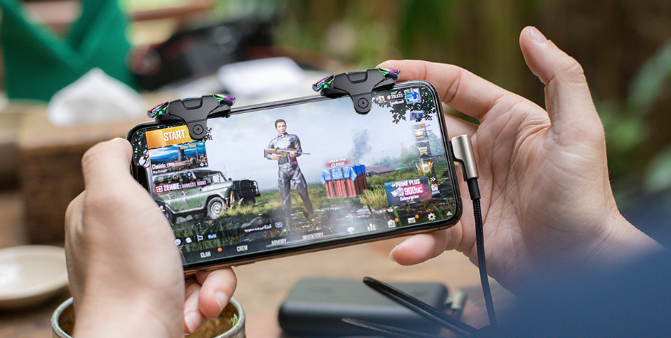
Games like PUBG Mobile and Free Fire are competitive, multiplayer shooters where fairness and skill balance are critical.
Using an auto clicker in these games is often associated with:
- Rapid firing advantages
- Reduced recoil through consistent input
- Unnatural tapping patterns
Because of this, developers actively discourage and penalize automation.
Anti-Cheat Systems and Detection
How Mobile Games Detect Auto Clickers?
Modern mobile games use advanced systems to detect:
- Abnormally consistent tap intervals
- Input patterns beyond human capability
- Unauthorized accessibility-based tools
Even subtle automation can raise red flags when monitored over time.
Consequences of Detection
If caught using an auto clicker in competitive games, players may face:
- Temporary suspensions
- Permanent account bans
- Loss of in-game purchases and progress
These penalties often apply without warnings.
Are Auto Clickers Ever Safe on Mobile?
Safer Use Cases
Auto clickers are generally acceptable in:
- Offline mobile games
- Single-player idle or clicker games
- Resource management games without competitive ranking
In these environments, automation enhances quality of life rather than disrupting fairness.
High-Risk Use Cases
Using auto clickers in:
- Online multiplayer shooters
- Ranked competitive modes
- Esports-oriented mobile games
comes with significant risk and is rarely worth it.
Technical Challenges of Auto Clicker for Mobile
Limited Precision
Compared to desktop tools, mobile auto clickers:
- Offer fewer customization options
- Can be less precise in fast-paced gameplay
- May interfere with touch controls
Performance and Stability Issues
Running an auto clicker alongside a heavy mobile game can:
- Increase battery drain
- Cause overheating
- Reduce overall device performance
This can negatively affect gameplay rather than improve it.
Common Misconceptions About Mobile Auto Clickers
“Low-Speed Automation Is Undetectable”
Many players believe slow or minimal automation avoids detection. In reality:
- Detection systems analyze patterns over time
- Consistency itself can be suspicious
- Updates can retroactively flag behavior
There is no guaranteed “safe” configuration.
Better Alternatives to Auto Clickers in Mobile Games
In-Game Settings Optimization
Players can improve performance by:
- Adjusting sensitivity and control layouts
- Customizing HUD and button placement
- Using gyroscope or aim assist features (where available)
Hardware and Accessories
- Gaming finger sleeves for better touch response
- High-refresh-rate devices
- External controllers (if officially supported)
These methods improve gameplay while staying within the rules.
Auto Clickers Beyond PUBG and Free Fire
Not all mobile games are competitive shooters. Auto clickers can be genuinely useful in:
- Mobile idle RPGs
- Farming and simulation games
- Incremental clicker titles
In such games, lightweight and reliable auto clicker tools are often favored for their simplicity, precise timing, and ease of control. Their effectiveness lies in subtle automation rather than aggressive optimization.
Performance vs Risk: Is It Worth It?
Potential Benefits
- Reduced finger fatigue
- Minor efficiency gains
- Convenience during repetitive tasks
Potential Risks
- Account bans
- Loss of purchased content
- Long-term restriction from competitive play
For competitive mobile games, the risks overwhelmingly outweigh the benefits.
Final Thoughts
Using an auto clicker for mobile games like PUBG Mobile, Free Fire, and similar titles may seem tempting, but it comes with serious consequences. While automation has a legitimate place in idle and single-player mobile games, competitive multiplayer environments demand fairness and human input.
If your goal is long-term enjoyment, skill development, and account safety, it’s far better to optimize settings, improve technique, and invest in better hardware than to rely on automation.
Auto clickers can be powerful tools—but on mobile, knowing where not to use them is just as important as knowing how they work.