

In today’s digital world, automation is becoming a key part of productivity, gaming, software testing, and repetitive online tasks. One of the simplest yet most powerful automation tools is an Auto Clicker. Whether you are using a browser, a desktop application, or a game, auto clickers simulate mouse input, saving time and effort.
This article provides a deep dive into how auto clicker explained work, their types, real-world applications, benefits, risks, and how they fit into the broader concept of input automation.
Table of Contents
What is an Auto Clicker Explained?
An Auto Clicker is a software tool that automatically generates mouse clicks without user interaction. It mimics human clicking behavior by sending input signals to the operating system or application.
Instead of physically clicking a mouse button, the tool performs:
- Left clicks
- Right clicks
- Double clicks
- Repeated clicks at set intervals
These clicks can be configured based on time delay, location, and frequency.
Understanding Input Automation
To understand Auto Clickers, we must first understand input automation. Input automation refers to the use of software to simulate human actions, such as:
- Mouse movements
- Keyboard input
- Screen interactions
- Touch events (on mobile systems)
Auto clickers are a subset of input automation tools focused on mouse clicks. In simple terms:
Input automation = full control automation
Auto clicker = click-based automation
How Auto Clickers Work?
Auto clicker explained operate by sending signals to the operating system that mimic real mouse events. These signals are interpreted by applications as actual user actions. The process generally includes:
1. Event Simulation
The tool generates virtual mouse click events like:
- MouseDown
- MouseUp
- Click event trigger
2. Timing Control
Users set the interval between clicks, such as:
- 1 second delay
- 100 milliseconds delay
- Randomized intervals for realism
3. Target Positioning
Clicks can be directed to:
- Current cursor location
- Fixed screen coordinates
- Predefined UI elements
4. Execution Loop
The tool repeats the process until stopped or until a set number of clicks is completed.
Types of Auto Clickers
There are several types of auto clickers, depending on their use and complexity.
1. Basic Auto Clickers
These are simple tools that:
- Click repeatedly at a fixed interval.
- They are easy to use
- Offer minimal customization
2. Advanced Auto Clickers
These include features like:
- Multi-point clicking
- Random delay generation
- Hotkey control
- Script-based automation
3. Browser-Based Auto Clickers
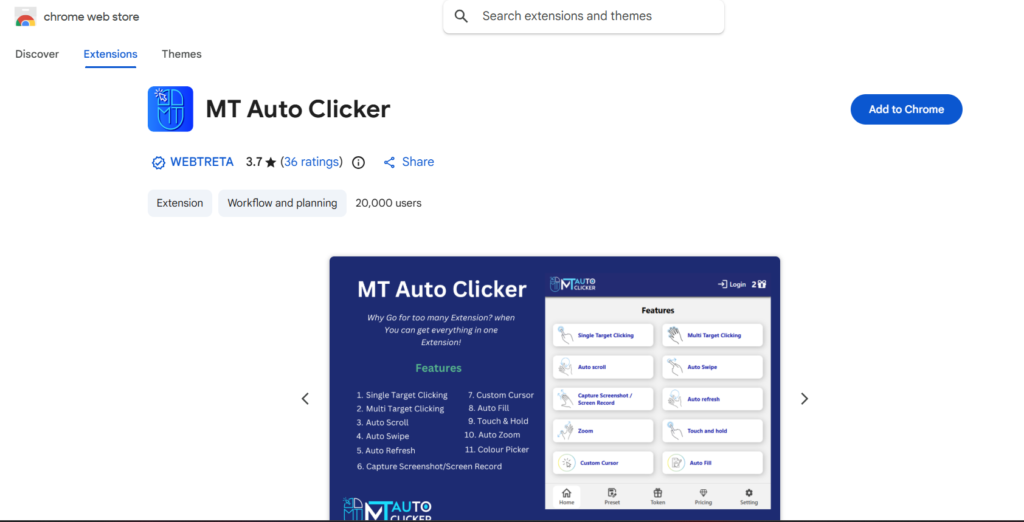
These work inside browsers like Google Chrome using extensions like MT Auto Clicker. They are commonly used for:
- Web testing
- Online games
- Form automation
4. Macro-Based Tools
These combine keyboard actions with clicking and complex sequences, often used in gaming or enterprise automation.
Common Use Cases of Auto Clickers
Auto clickers are widely used across various fields.
1. Online Gaming
Many browser-based or idle games require repetitive clicking. Auto clickers help players:
- Automate resource collection
- Perform repetitive actions
- Reduce physical strain
2. Software Testing
Developers and testers use auto clickers to:
- Simulate user interactions
- Test UI responsiveness
- Run repetitive test cases.
3. Data Entry and Web Tasks
They are useful for:
- Clicking through forms
- Automating repetitive submissions
- Navigating dashboards
4. Productivity Automation
Office workers sometimes use auto clickers to:
- Refresh dashboards
- Automate repetitive UI tasks
- Speed up workflow actions.
Benefits of Using Auto Clickers
Auto clicker explained offer several advantages when used correctly.
- Saves Time: Repetitive clicking tasks that take hours manually can be completed in minutes.
- Reduces Physical Strain: Continuous clicking can lead to fatigue or repetitive strain injuries. Automation reduces this risk.
- Increases Efficiency: Tasks are performed faster and more consistently than manual clicking.
- Improves Accuracy: Auto clickers reduce human error in repetitive tasks.
- Useful for Testing: They help simulate consistent user behavior for debugging applications.
Risks and Limitations
Despite their benefits, auto clickers also pose risks.
1. Violation of Terms of Service
Many online games and platforms prohibit the use of automation tools. Using auto clickers may result in:
- Account bans
- Suspensions
- Access restrictions
2. Security Risks
Untrusted auto clicker software may contain:
- Malware
- Spyware
- Adware
3. System Overload
Very fast click intervals can cause:
- Application crashes
- Browser freezing
- System lag
4. Ethical Concerns
Using automation in competitive environments may be considered unfair.
Auto Clickers vs Full Automation Tools
Auto clickers are simpler than full-automation frameworks.
| Features | Auto Clicker | Automation Tools/RPA Tools |
| Complexity | Low | High |
| Scope | Mouse clicks only | Full workflow automation |
| Use Case | Repetitive clicking | Business process automation |
| Learning Curve | Easy | Moderate to advanced |
How Auto Clickers Fit into Modern Automation?
Auto clicker explained are often the first step in understanding automation. They introduce key concepts like:
- Event simulation
- Task repetition
- Workflow optimization
- User behavior emulation
They serve as a foundation for more advanced automation technologies used in software development, DevOps, and enterprise systems.
Best Practices for Safe Usage
To use auto clickers effectively and safely, follow these guidelines:
- Use trusted software sources only.
- Avoid using on sensitive websites.
- Set reasonable click intervals.
- Test in safe environments first.
- Understand platform rules before automation.
Responsible usage ensures both system safety and account security.
Future of Input Automation
The future of tools like auto clicker explained is evolving rapidly. With advancements in AI and machine learning, automation tools are becoming:
- Smarter (context-aware clicking)
- More human-like (randomized behavior patterns)
- Integrated with workflows (browser + desktop automation)
- Cloud-based and cross-platform
In the future, traditional auto clickers may be replaced by intelligent automation systems that can understand UI changes and adapt accordingly.
Conclusion
Auto clicker explained are simple yet powerful tools that are an important part of input automation. They simulate mouse clicks to automate repetitive tasks, improve productivity, and reduce manual effort.
Whether used for gaming, testing, or productivity, they provide a quick entry point into the world of automation. However, they must be used responsibly, keeping in mind platform rules, security risks, and ethical considerations.
As automation technology continues to evolve, auto clickers remain a foundational concept that demonstrates how small tools can significantly enhance digital efficiency.