

In today’s fast-moving digital world, automation tools are no longer optional—they are essential. Whether you are a gamer, developer, or someone who performs repetitive tasks daily, using an auto clicker app can save you time, effort, and even improve your efficiency.
Among the many tools available, MT Auto Clicker stands out as one of the most reliable and user-friendly solutions. In this article, we’ll explore how auto clicker apps work, why they are useful, and why MT Auto Clicker is a great choice for beginners and advanced users alike.
Table of Contents
What Are Auto Clicker Apps?
Auto clicker apps are software tools designed to automate repeated clicks or taps on a device. Instead of manually tapping or clicking continuously, these apps perform the task automatically based on your settings.
These tools are widely used in:
- Mobile and PC gaming
- Repetitive office tasks
- App testing and development
- Online automation activities
With just a few configurations, you can eliminate manual effort and let the tool do the work for you.
How Auto Clicker Apps Work?
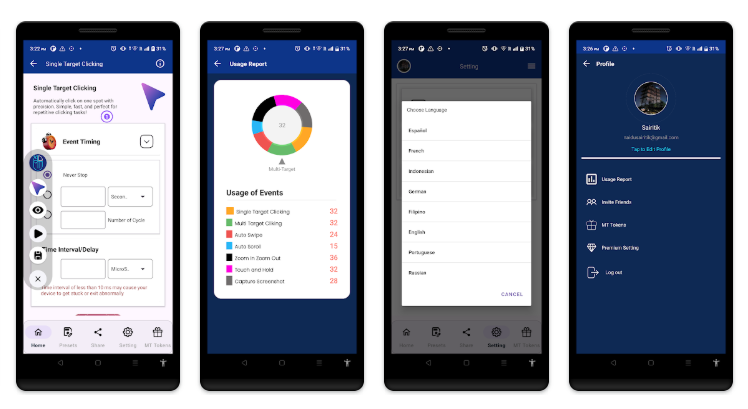
Auto clicker apps simulate touch or mouse input on your device. They follow predefined instructions set by the user.
Step 1 – Permission Setup
Most auto clicker apps require accessibility permissions to control touch actions on your device.
Step 2 – Select Click Points
You can define where the clicks should happen on your screen. Some apps support multiple points for complex tasks.
Step 3 – Set Timing
You can configure:
- Click speed
- Delay between clicks
- Duration of automation
Step 4 – Start Automation
Once everything is set, you simply start the auto clicker, and it begins performing clicks automatically. MT Auto Clicker makes the entire process smooth with a simple, intuitive interface.
Why You Might Need an Auto Clicker App?
Auto clicker apps are useful in many real-life scenarios. Let’s explore some common use cases.
1. Gaming Automation
Many games require constant tapping or clicking, especially idle or click-based games. Using MT Auto Clicker helps you:
- Farm resources automatically.
- Progress faster in games.
- Reduce manual effort.
Instead of spending hours tapping, you can let the tool handle repetitive actions.
2. Productivity Enhancement
If your work involves repetitive digital tasks, an auto clicker can boost your productivity. MT Auto Clicker allows you to automate tasks like:
- Form submissions
- Data entry clicks
- Repetitive workflows
This helps you focus on more important work rather than wasting time on simple tasks.
3. App Testing and Development
Developers use auto clickers to test applications under repeated actions. MT Auto Clicker can simulate continuous user interaction, making it useful for:
- UI testing
- Performance testing
- Stress testing apps
4. Time Saving
One of the biggest advantages is time efficiency. Tasks that take hours to complete manually can be completed in minutes with automation.
Why Choose MT Auto Clicker?
While there are many auto clicker apps available, MT Auto Clicker offers a perfect balance of simplicity and performance.
- Easy to Use Interface: MT Auto Clicker is designed for all users. Even beginners can start using it without any technical knowledge.
- Multi-Point Clicking: You can set multiple click points on your screen, which is useful for advanced tasks and gaming automation.
- Custom Click Speed: You can control how fast or slow the clicks should happen. This flexibility makes it suitable for a range of use cases.
- Lightweight and Fast: MT Auto Clicker runs smoothly without slowing down your device. It is optimized for performance and stability.
- No Root Required: You don’t need to root your Android device to use MT Auto Clicker, making it safe and accessible for everyone.
6. Floating Control Panel
The floating control panel allows you to start or stop automation easily while using other apps.
How to Use MT Auto Clicker?
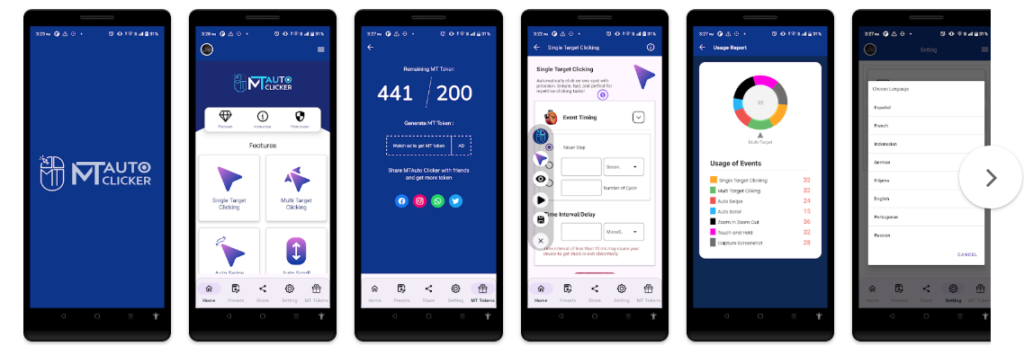
Getting started with MT Auto Clicker is very simple. Follow these steps:
Step 1 – Install the App
Download and install MT Auto Clicker from a trusted source.
Step 2 – Grant Permissions
Enable accessibility and overlay permissions when prompted.
Step 3 – Set Click Points
Place one or multiple points on your screen where you want clicks to occur.
Step 4 – Configure Settings
Adjust:
- Click interval
- Duration
- Repeat count
Step 5 – Start Clicking
Press the start button and let MT Auto Clicker handle the rest.
Benefits of Using MT Auto Clicker
- Saves Time: Automates repetitive tasks instantly, allowing you to focus on important work.
- Reduces Manual Effort: No need for continuous tapping or clicking.
- Improves Efficiency: Complete tasks faster and more accurately.
- Enhances Gaming Experience: Helps you progress in games without constant manual input.
Tips for Best Results
To get the most out of MT Auto Clicker, keep these tips in mind:
- Use Moderate Click Speed: Extremely high speeds may cause issues in some apps or games.
- Follow Platform Rules: Some platforms may restrict the use of automation tools, so use them responsibly.
- Save Configurations: If you perform similar tasks often, save your settings for quick reuse.
- Monitor Performance: Keep an eye on your device to ensure smooth operation.
Is MT Auto Clicker Safe?
MT Auto Clicker is safe to use when downloaded from trusted sources. It does not require root access and only uses necessary permissions. However, always:
- Download from official or trusted platforms.
- Avoid unknown or modified versions.
- Use responsibly to prevent misuse.
Future of Auto Clicker Apps
Automation tools like MT Auto Clicker are continuously evolving. In the future, we can expect:
- AI-powered automation
- Smart gesture recognition
- Advanced scripting features
- Improved security systems
These advancements will make auto clicker apps even more powerful and user-friendly.
Final Thoughts
Auto clicker apps have become essential tools for modern users who want to save time and improve efficiency. From gaming to productivity, these tools simplify repetitive tasks and enhance performance.
If you’re looking for a reliable and easy-to-use solution, MT Auto Clicker is a great choice. With its powerful features, simple interface, and smooth performance, it helps you automate tasks effortlessly.
Start using MT Auto Clicker today and experience a smarter, faster way to handle repetitive actions.